Loading...
Please wait while we prepare your content
Note: For a better view of the exercise and solution panel, please close the left sidebar.
Data cleaning in SQL refers to the process of identifying and correcting or removing errors, inconsistencies, and inaccuracies from a dataset, with the aim of improving its quality and usability.
In SQL, data cleaning can involve a variety of techniques and functions, such as:
DISTINCT keyword or the GROUP BY clause.IS NULL or IS NOT NULL operators, or the COALESCE function.UPPER, LOWER, TRIM, and REPLACE.SOUNDEX or the LIKE operator.WHERE clause and aggregate functions like AVG, MIN, MAX, and SUM.By performing data cleaning in SQL, we can ensure that our analysis and reporting is based on accurate and consistent data, which leads to better decision-making and more meaningful insights.
COALESCECOALESCE is a SQL function that is used to return the first non-null expression among a list of expressions.
It takes a variable number of arguments and returns the first non-null expression.
If all arguments are null, it returns null.
The syntax for COALESCE is:
COALESCE(expression1, expression2, ..., expression_n)For example, suppose we have a table called "Employees" with columns "FirstName", "LastName", and "MiddleName". We want to select the full name of each employee, but some employees don't have a middle name:
SELECT first_name, last_name, COALESCE(middle_name, '') AS middle_name
FROM employees;
In this example, COALESCE is used to return an empty string if an employee doesn't have a middle name,
so that the full name is still displayed correctly.
ABS(x): return absolute value. Example ABS(-14) → 14CEIL(x): nearest integer greater than or equal to argument. Example CEIL(-4.8) → -4FLOOR(x): nearest integer less than or equal to argument. Example FLOOR(-4.8) → -5ROUND(x): round to nearest integer. Example ROUND(42.4) → 42ROUND(x, n): round to n decimal places. Example ROUND(42.4382, 2) → 42.44TRUNC(x, n): truncate to n decimal places. Example TRUNC(42.4382) → 42.43DIV(y, x): integer quotient of y/x. Example DIV(9,4) → 2MOD(y, x): remainder of y/x. Example MOD(9, 4) → 1POWER(a, b): a raised to the power of b. Example POWER(2, 10) → 1024RANDOM(): random value in the range 0 → 1LEFT() & RIGHT()LEFT and RIGHT are SQL functions used to extract a specified number of characters from the beginning or end of a string, respectively.
The syntax is:
LEFT(string, length)
RIGHT(string, length)
LEFT() returns the specified number of characters from the beginning of the string. RIGHT() returns the specified number of characters from the end of the string.
For example, the following query returns the first three characters of the "City" column in the "Customers" table:
SELECT LEFT(City, 3) FROM Customers;POSITION()POSITION takes a character and a column, and provides the index where that character is for each row. The index of the first position is 1 in SQL.
The syntax is:
POSITION(substring IN string)Example, suppose we have a table employees with the column name, we can split name into first_name and last_name like this:
SELECT LEFT(name, POSITION(' ' in name) - 1 ) AS first_name,
       RIGHT(name, LENGTH(name) - POSITION(' ' in name)) AS last_name
FROM employees;
LENGTH(): Used to return the length of a string.
| Function                                                     | Description                                                                                                              | Example                             | Result       |
| ------------------------------------------------------------ | ------------------------------------------------------------------------------------------------------------------------ | ----------------------------------- | ------------ |
| LOWER(string)                                                | Convert string to lower case                                                                                             | LOWER('CODERSCHOOL')                | coderschool  |
| UPPPER(string)                                               | Convert string to upper case                                                                                             | UPPER('hcmc')                       | HCMC         |
| TRIM([LEADING or TRAILING or BOTH] [characters] FROM string) | Remove the longest string containing only the characters (a space by default) from the start/end/both ends of the string | TRIM(BOTH 'x' FROM 'xTomxx')        | Tom          |
| CONCAT(string1, string2, ...)                                | Concatenate all arguments. NULL arguments are ignored.                                                                   | CONCAT('abcde', 2, NULL, 22)        | abcde222     |
| REPLACE(string, from_str, to_str)                            | Replace all occurrences in string of substring from_str with substring to_str                                            | REPLACE('abcdefabcdef', 'cd', 'XX') | abXXefabXXef |
| REPEAT(string, number)                                       | Repeat string the specified number of times                                                                              | REPEAT('Pg', 4)                     | PgPgPgPg     |
| SUBSTRING(string, from, for)                                 | Extract substring                                                                                                        | SUBSTRING('Thomas', 2, 3)           | hom          |
| SUBSTRING(string FROM pattern) | Extract substring matching POSIX regular expression. | SUBSTRING('Thomas' FROM '...$') | mas |SQL has several date/time operators that can be used to perform various operations on date and time values. Some of the most common operators include:
| Operator | Example                                                     | Result                          |
| -------- | ----------------------------------------------------------- | ------------------------------- |
| +        | date '2001-09-28' + integer '7'                             | date '2001-10-05'               |
| +        | date '2001-09-28' + interval '1 hour'                       | timestamp '2001-09-28 01:00:00' |
| +        | date '2001-09-28' + time '03:00'                            | timestamp '2001-09-28 03:00:00' |
| +        | interval '1 day' + interval '1 hour'                        | interval '1 day 01:00:00'       |
| +        | timestamp '2001-09-28 01:00' + interval '23 hours'          | timestamp '2001-09-29 00:00:00' |
| +        | time '01:00' + interval '3 hours'                           | time '04:00:00'                 |
| -        | - interval '23 hours'                                       | interval '-23:00:00'            |
| -        | date '2001-10-01' - date '2001-09-28'                       | integer '3' (days)              |
| -        | date '2001-10-01' - integer '7'                             | date '2001-09-24'               |
| -        | date '2001-09-28' - interval '1 hour'                       | timestamp '2001-09-27 23:00:00' |
| -        | time '05:00' - time '03:00'                                 | interval '02:00:00'             |
| -        | time '05:00' - interval '2 hours'                           | time '03:00:00'                 |
| -        | timestamp '2001-09-28 23:00' - interval '23 hours'          | timestamp '2001-09-28 00:00:00' |
| -        | interval '1 day' - interval '1 hour'                        | interval '1 day -01:00:00'      |
| -        | timestamp '2001-09-29 03:00' - timestamp '2001-09-27 12:00' | interval '1 day 15:00:00'       |
| *        | 900 * interval '1 second'                                   | interval '00:15:00'             |
| *        | 21 * interval '1 day'                                       | interval '21 days'              |
| *        | double precision '3.5' * interval '1 hour'                  | interval '03:30:00'             |
| / | interval '1 hour' / double precision '1.5' | interval '00:40:00' |SQL also has a variety of built-in functions for manipulating and formatting date and time values. These functions can be used to calculate the difference between two dates, extract the current date or time, format date/time values, and more.
Some common date/time functions include:
| Function                      | Description                                                                  | Example                                   | Result                  |
| ----------------------------- | ---------------------------------------------------------------------------- | ----------------------------------------- | ----------------------- |
| AGE(timestamp, timestamp)     | Subtract arguments, producing a "symbolic" result that uses years and months | AGE('2001-04-10', '1957-06-13')           | 43 years 9 mons 27 days |
| AGE(timestamp)                | Subtract from CURRENT_DATE (at midnight)                                     | AGE('1957-06-13')                         | 43 years 8 mons 3 days  |
| CURRENT_DATE                  | Current date                                                                 |                                           |                         |
| CURRENT_TIME                  | Current time of day                                                          |                                           |                         |
| DATE_PART(text, timestamp)    | Get subfield (equivalent to EXTRACT)                                         | DATE_PART('hour', '2001-02-16 20:38:40')  | 20                      |
| EXTRACT(field from timestamp) | Get subfield                                                                 | EXTRACT(hour from '2001-02-16 20:38:40')  | 20                      |
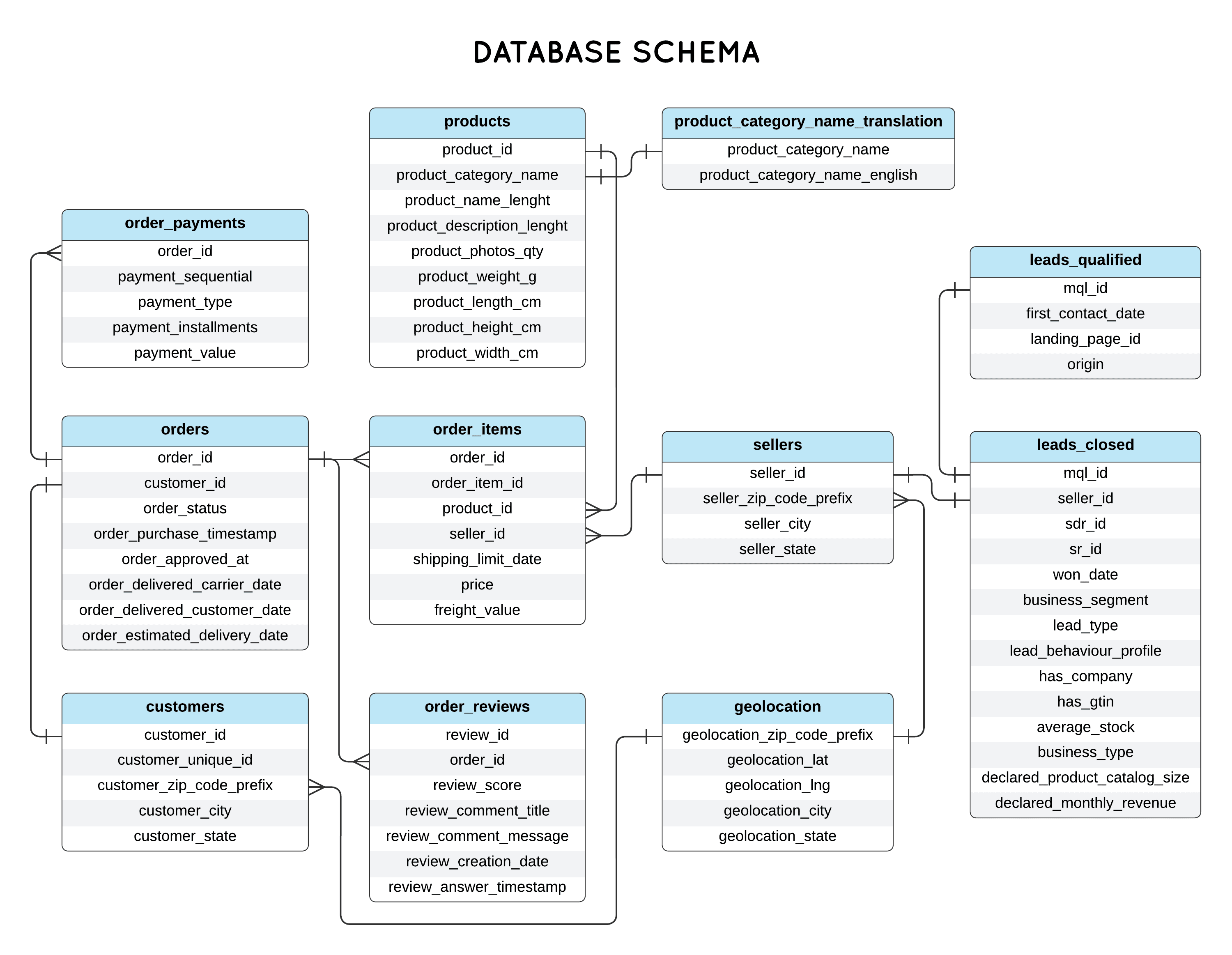
| DATE_TRUNC(text, timestamp) | Truncate to specified precision | DATE_TRUNC('hour', '2001-02-16 20:38:40') | 2001-02-16 20:00:00 |Work in the Code Editor panel. Switch databases as noted (titanic vs olist); use the schemas at the bottom of this page when you need column names.
Use titanic db. If Cabin is NULL, show the string 'Unknown' (for example with COALESCE).
Use titanic db. If Age is NULL, substitute the average age across the dataset. Bonus: round that average to two decimal places before you use it.
Use titanic db.
Use olist db. Compare order_approved_at and order_estimated_delivery_date on orders.
Use olist db. Join order_items to orders so you can filter and group by purchase time; revenue is price + freight_value summed per quarter. The sample solution shows SQLite-style quarter logic; the second block is an alternate shape for SQL Server.
| # | Column Name | Note |
|---|---|---|
| 1 | PassengerId | Primary Key |
| 2 | Survived | Survival 0 = No, 1 = Yes; Values that indicate only [A or B] like survival status [death or alive] could create very unique queries |
| 3 | Pclass | Ticket class 1 = 1st, 2 = 2nd, 3 = 3rd |
| 4 | Name | Name of Passengers |
| 5 | Sex | Gender male/female |
| 6 | Age | Age in years |
| 7 | SibSp | # of siblings / spouses aboard the Titanic |
| 8 | Parch | # of parents / children aboard the Titanic. Some children travelled only with a nanny, therefore parch=0 for them. |
| 9 | Ticket | Ticket number |
| 10 | Fare | Passenger fare |
| 11 | Cabin | Cabin number |
| 12 | Embarked | Port of Embarkation C = Cherbourg, Q = Queenstown, S = Southampton |