Loading...
Please wait while we prepare your content
Games are one of the most popular industries nowadays. With new games being created every minute and relayed through TV, radio, and the internet, the updated news on a game is already old by the next morning. That's why game publishers such as Steam created a website to help users get the most up-to-date information about games with ease.
So, game lovers on Steam read news and info on games from the convenience of their work desktops or mobiles. The traffic of these online services is rewardingly high—we could run ads and generate a good amount of money. 💰
We are making a Steam app store—ours will be better. Our inspiration is Steam. You can either make an exact clone or freestyle as you like. (🚀 It is more challenging to create an exact clone.)
Honorable submission: Here are good submissions from past students 👍 — e.g. Hieu Trung Nguyen.
We often use API services from others to have dynamic and up-to-date data in our application.
The mentors at CoderSchool created an API service to help you get the latest game data. You are expected to find your way through this API by reading its documentation.
Base URL: https://cs-steam-api-production.up.railway.app/
API documentation: https://cs-steam-api-production.up.railway.app/docs
| Endpoint | Description |
|---|---|
| GET /api/games | List of games |
| GET /api/games/ | Game detail by app ID |
| GET /api/genres | List of genres |
| GET /api/tags | List of tags |
Our suggested design — simplified sketch:
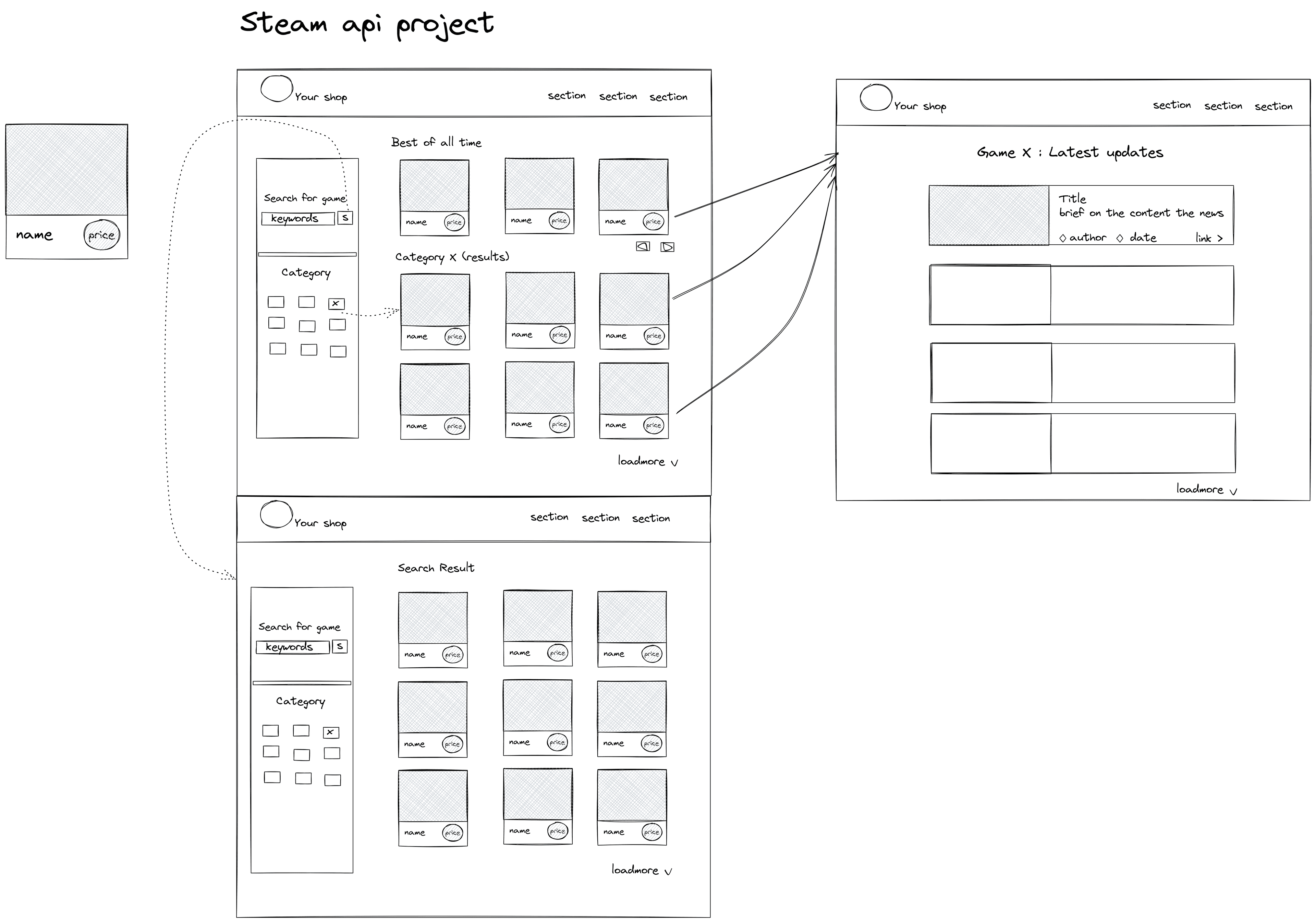
You can use Excalidraw or any mockup tool to sketch your initial UI. Go wild 🔥.
As a developer, you will get familiar with the term "user story" at the start of any project. It describes what the user will be able to do or see. Format:
| # | User story |
|---|---|
| 1 | User can see a list of games from the API in any format (list, gallery, …). |
| 2 | User can see initial game info (image, title, price, …) in each item. |
| 3 | User can see a Search input box. |
| 4 | User is able to search for games by app name. |
| 5 | User is able to see the search results. |
| 6 | User can see a list of all genres (categories). |
| 7 | User is able to filter games that match the genre and tag buttons that are clicked. |
| 8 | User sees the website with a clean UI design. |
| 9 | User can view the website on an iPhone X screen size (responsive). |
User can click any game item in the gallery to see the detail of only that selection's detail (name, tags, description, price, developer...), replacing the current gallery.
There are 2 ways to make this happen. Redirect to a new HTML page and replace the HTML element of the current page:
The first method involves creating a new .html and .js page that will be rendered when an a tag is clicked. The challenge of this approach is passing the appId from the original script.js & index.html to the new .html & .js file so that the later duo could make the API request with the correct appId for example: https://someApi/appId/{appId}. Find more information about the window object mentioned in the lecture videos and look into the window.location property document to find the solution.
This is the conventional way to render an item detail page in web development.
The second one involves creating a new HTML element to replace the current display of the page. For example: main, body, .gallery. The challenges of this approach are:
This project is designed to test your understanding of:
fetch.You start with 100%; points are deducted for missing features. Passing grade is 80%.
| Item | Deduction |
|---|---|
| Missing rocket 🚀 | -5% |
| Missing any other user story (non-rocket) | -5% per story |
| Clustered / messy UI | -5% |
Good luck, have fun coding! GLHF 🎮